 Quanta Analytics
The who, what, where, when and why of your Rust server.
Quanta Analytics records what happens on your server and turns it into answers. It's more than a leaderboard or a ranking site. It's built for server owners who actually want to understand what's happening on their servers. One plugin for Oxide or Carbon, over 20 dashboard pages for you and your staff, and Steam and Discord account linking built in.
Free closed beta, open to a small number of servers.
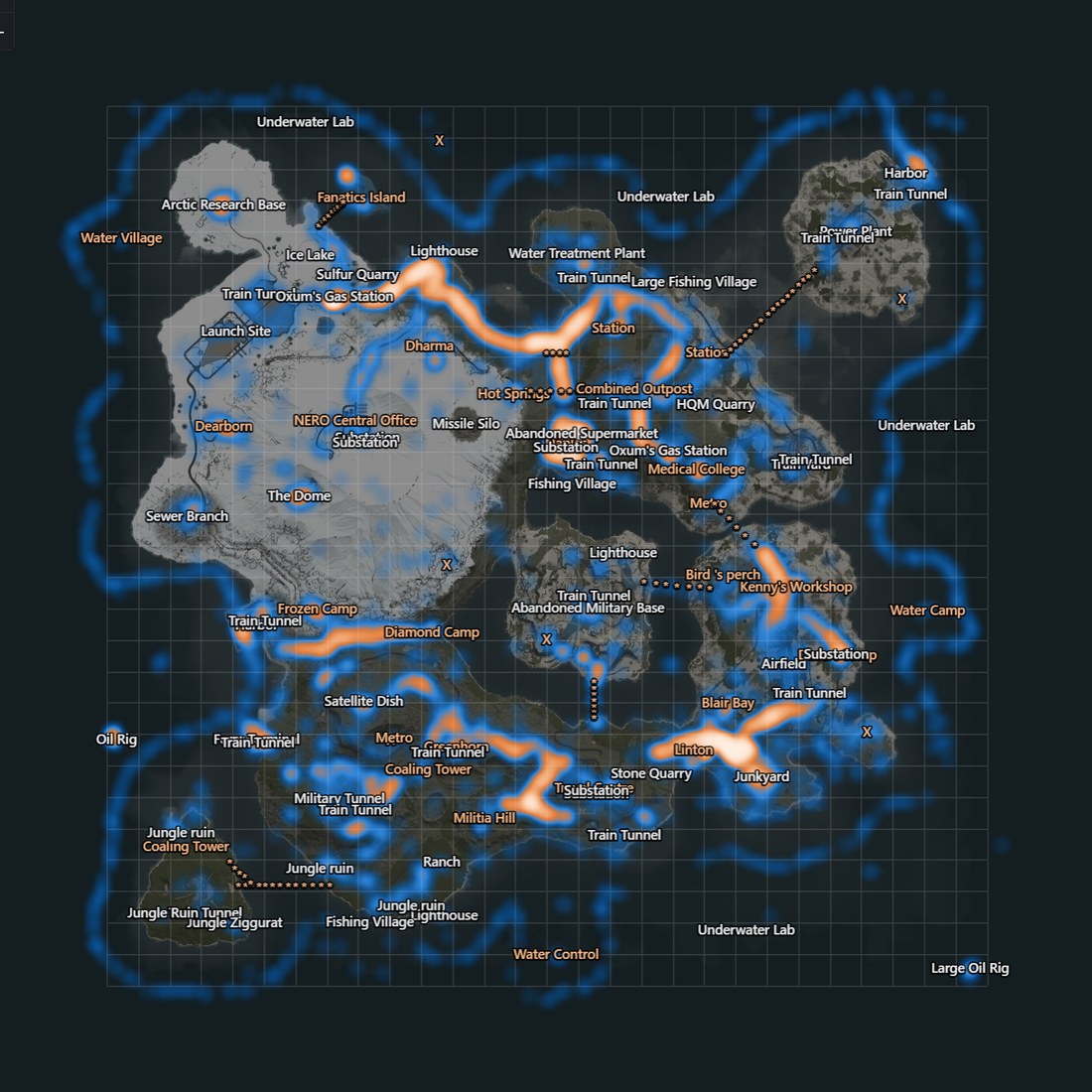
A live server's looting heatmap. Switch between PvP kills, building, looting and gathering.
Every event, five answers
Kills, loot, chat, sessions and staff actions are recorded as they happen, so each one can be traced back to a person, a place and a moment.
Who
Every player, clan and staff member. See who's carrying, who's cheating and who's actually on duty.
What
Kills, loot, gathering, crafting, building, upkeep, keycards and chat, all tracked.
Where
Heatmaps and monument stats show where fights happen and which spots nobody runs.
When
When players log on, when they drop off, and how this wipe compares to the last.
Why
The part that matters. What changed when players left, and what to fix next.
See it in action
Real pages from the dashboard. Player names are hidden.


The questions it answers
Every number is broken down by wipe and compared with your last ones, so you can tell whether a change you made worked.
- Why do players leave?
- See where your population drops off and what new players struggle with.
- Day 1, 3 and 7 retention, and how many players come back from last wipe
- Each wipe's half-life: the day it loses half its players
- Questions new players ask in chat in their first 24 hours
- Which maps and sizes hold players longest
- Who's cheating, and who's just good?
- Separate real problems from salty reports.
- Accuracy and headshot rates compared with what others get using the same weapons
- Reports from several players, versus reports filed right after dying
- New accounts showing up on a banned player's IP
- Steam VAC and game bans for everyone who joins
- Is my server balanced?
- Find the parts of your map and progression that don't work.
- Each monument's risk against its loot, and monuments nobody visits
- Which NPCs and animals win their fights, and where
- What each keycard puzzle pays out, and how far players get up the card ladder
- When players reach tier 3, metal walls and their first rockets
- Are players getting griefed?
- See how players treat each other, not just how many kills there are.
- Kills on fresh spawns and unarmed players
- The same player killing the same victim again and again
- How often downed players are saved, with and without a teammate online
- Is my staff keeping up?
- Know when you're covered and how your team uses its powers.
- Players online against staff online, hour by hour
- How quickly reports get a response, and which never do
- Kills and looting while noclip, godmode or vanish were on
- Items staff spawned, and who received them
- Who should my staff keep an eye on?
- Shared staff notes on every player, so nobody has to remember who did what.
- Tag notes as Toxic, Cheating, Teaming, +Rep, -Rep or General
- Record where it happened: one of your servers, your Discord, or somewhere else
- Pin the ones that matter, and spot noted players at a glance in the player list
- Each player's linked Discord account right on their profile
- Only your team sees your notes, and roles decide who can write them
- What needs my attention right now?
- A notification bell in the dashboard, and posts in your Discord if you want them.
- A server that stops sending data, and when it's back
- Player reports, bans and website feedback as they come in
- Unusual accuracy, and staff spawning items you're watching
- New wipes, new player peaks and plugin updates
- Each person mutes what they don't need, and you pick what goes to Discord
- What are players complaining about?
- Catch problems in chat before they turn into empty wipes.
- Mentions of lag, bugs, cheaters and calls for staff, with trends
- What F7 feedback is about
- Notes advertising other servers or sharing Discord invites, with every saved version checked
- Is my store paying off?
- See what your supporters get out of the server, and who might become one.
- Players each day, split into paid and free
- Who joins and leaves your paid groups
- Your most engaged supporters, and regulars who haven't bought anything yet
- The skins players own in Steam, and whether they use them on your server
- What's slowing my server down?
- Big bases drive entity count, and with it server performance.
- Building pieces and foundations per base, biggest first
- What each base costs in upkeep a day, and which ones are decaying
- Who builds the most, and how building ramps up through the wipe
- What gets crafted each wipe, including explosives
- Is my loot worth taking?
- See what players actually want from your crates, not just what they open.
- How often each crate is emptied, and what gets left behind
- Items players leave when they find them
- Monuments where crates are left partly looted
- Who are my best players?
- See who's putting in the hours and who's winning the fights.
- Top players by playtime, this wipe and all time, with rank search
- Top three for every weapon by kills or accuracy
- Pin a player to see where they rank on every weapon
Every detail when you need itEach player's sessions on a map, every kill, loot, craft and chat line, and a searchable admin log.
Your staff, your rulesInvite your team and choose which pages each role can open.
Your time zoneDaily charts and wipe dates follow the time zone of whoever is looking.
Your custom itemsItems a plugin renames, like a nailgun turned "Mining Gun", get their own rows under that name.
Account linking, built in
Reward players for linking their Steam and Discord, without paying for a separate linking service. Your community gets its own link page, and a second plugin hands out the rewards in game.
- Link once, in seconds
- Players sign in with Steam and Discord on your page at link.quantaanalytics.gg.
- One link works for every community that uses Quanta Analytics
- Joining another community is one click
- Optionally adds players to your Discord server as they link
- Players can leave or unlink themselves on the same page
- Rewards you control
- Linking gives in-game permission groups, on Oxide or Carbon. You decide what each one is worth.
- A group for every linked player
- A group while they boost your Discord server
- A group while they're in your Steam group
- Kept in sync with Discord
- Our bot keeps roles and rewards in step with your Discord server.
- A Linked role, plus an optional role for Steam group members
- Players who leave your Discord lose their linking rewards until they rejoin
- Rewards and roles come off on their own when they no longer apply, like when a boost ends
- See who links
- Follow linking from your dashboard, or right in Discord.
- Every linked player in a searchable list, with their Discord
- Posts in a Discord channel of your choice when players link, leave, boost or join your Steam group
On your own website
Put your server's data in front of your players, on the site you already have. Both are off until you switch them on.
- Public leaderboards
- A live feed your website can read to show your top players, with no login.
- Kills: players, NPCs, zombies, scientists, patrol helis and Bradleys
- Gathering: wood, stone, metal, HQM and sulfur
- Shots fired, accuracy and hours played
- This wipe or all time
- Only names and counts go out, never IPs, chat or sessions
- A feedback form
- Let players send feedback from your website, straight to your dashboard.
- Link to it or embed it, on WordPress, Tebex or any other site
- Match its colors to your site
- Players pick which of your servers it's about
- Spam protection built in
- New feedback shows up in your notifications
Join the beta
The beta is free, with every feature unlocked. In return, tell us what helped you improve your server, what's broken and what's missing. Nothing turns into a paid plan without your say.
- Connect your Steam and Discord. Both are linked once when you sign up. After that, either one signs you in.
- Create your organization and ask for beta access. Open a ticket on our Discord with your organization's name, typical peak population, and whether you run Oxide or Carbon.
- Register your server and install the plugin. Paste two values into the plugin's config and reload it. Data appears on your dashboard within a minute.
Missing something?If there's an insight you want that we don't track yet, tell us. If it helps you understand your server, we'll do our best to build it.
Player data is only ever shown to the server's own owner and the staff they choose, and we never sell it. Server owners tell their players what's collected. Read the privacy policy.